
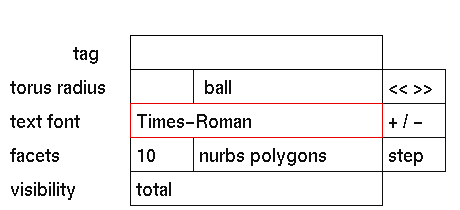
Purpose
To change the current font selection.
Usage
Click the fonts button to activate it. The selection submenu will
be
displayed where you can make your selection
Comments
GIG provides access to PostScript type 1 fonts as supplied by the
underlying
operating systems.
ISOLatin fonts
PostScript type 1 fonts usually define two character sets: a standard
set and an ISOLatin set. Which set is actually used is determined
by the environment variable ISOLATIN. If this variable
is not set (default) then the standard set is used; if you want to
use ISOLatin fonts then you will have to type:
setenv ISOLATIN ""before starting GIG (or uncomment the corresponding line in your
.cshrc file).
Many custom or third-party font definitions do not have an ISOLatin
character set defined. If the ISOLATIN variable is set, creating a
text solid with such a font will result in the text 'Font-name
ISOLatin 1'. If this happens, type unsetenv ISOLATIN and
restart GIG.
Using fonts from other systems
Besides using PostScript fonts supplied with an operating system,
it is
possible to install PostScript fonts from other systems.
Depending on the system, PostScript type 1 fonts are stored in one
of the
following file formats:
Where to place the fonts on the workstation PostScript fonts in UNIX file format consist of two files: a 'base' file and an 'afm' file. These files should be placed in the proper directory depending on the workstation. Note the following:
Silicon Graphics
- The 'base' font files are placed in:
'/usr/lib/DPS/outline/base' (do not use an extension).
- The 'afm' font files are placed in:
'/usr/lib/DPS/outline/afm'.
SUN, Solaris 1.X-2.2 (Openwin 3.1)
- The 'base' font files are placed in:
'/usr/openwin/lib/fonts' and should have the extension '.pfa'.
- The 'afm' font files are placed in:
'/usr/openwin/lib/fonts/afm'.
SUN, Solaris 2.3 (Openwin 3.2)
- The 'base' font files are placed in:
'/usr/openwin/lib/X11/fonts/Type1/outline' and should have the
extension '.pfa'.
- The 'afm' font files are placed in:
'/usr/openwin/lib/X11/fonts/Type1/afm
To access fonts in GIG 3DGO V2.3.5 from Solaris 2.3, the environment variable 'GIG_D_FONTS' needs to be changed. See the following steps:
	login as gig and make sure you are in the home directory
	edit the file '.cshrc'
	Change the following sentence:
		setenv GIG_D_FONTS /usr/openwin/lib/fonts
	to:
		setenv GIG_D_FONTS /usr/openwin/lib/X11/fonts/Type1/outline
	Save the file, log out and login as gig
Note - The name of the font file has to be the same as the name of the font.
HP (HP-UX 9.0.5 and up) and Linux (2.0.0 and up)
On HP workstations and Linux PCs it is possible that the default installation of GIG can not read the font files. The problem is caused by the distinction between the fontname and the fontfilename.
The workaround: rename the Postscript fonts on your system. This can be done in the following way:
$GIG_D_FONTS in your GIG account)
on HP:
cd /usr/lib/X11/fonts/type1.st/typefaces
by default on Linux:
cd /usr/X11R6/lib/fonts/Type1
If the fonts in your Linux installation are in some other directory, make
sure that the GIG_D_FONTS environment variable is set correctly.
E.g. if your fonts are in /usr/lib/my_fonts then do:
setenv GIG_D_FONTS /usr/lib/my_fonts
cd $GIG_D_FONTS
grep FontName *.pfa
You should get a list like:
UTBI____.pfa:/FontName /Utopia-BoldItalic def
UTB_____.pfa:/FontName /Utopia-Bold def
UTI_____.pfa:/FontName /Utopia-Italic def
UTRG____.pfa:/FontName /Utopia-Regular def
ln -s UTBI____.pfa Utopia-BoldItalic.pfa
etc.


