GIG reference manual
RenderManager
____________________________________________________________________________________

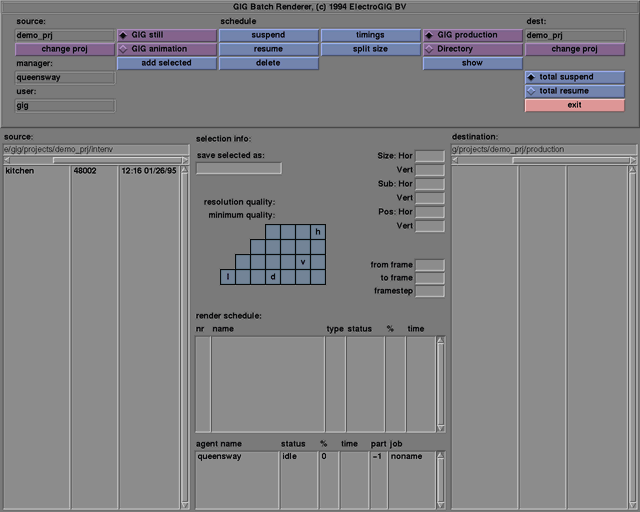
Note: as of release 3.2, the RenderManager is considered obsolete and no longer
supported. See also the gigrs
command line utility.
____________________________________________________________________________________
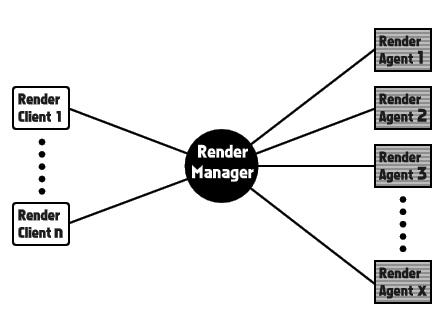
In the distributed rendering process there are three types of processes to be distinguished: Manager, Agents, and Client. For the user, these processes are more or less relevant depending on the kind of network, the number of machines, and the network administrator.
The Manager process has the main control. It receives commands from the Client process and distributes the jobs to the Agents and collects final images from them.
There are one or more Agent processes, depending on the number of processors that are dedicated to the rendering process. There is only one Agent process running for each processor.
Basically there is one Client process with a Graphical User Interface to list jobs and track the rendering process.
____________________________________________________________________________________
This section gives information about the installation of the RenderManager. First the installation on one machine will be explained, then an explanation will follow regarding installation on a network.
Installation on one machine only
The installation is done automatically when you install a normal GIG. However, the GIG installation must be slighty adjusted for the RenderManager because it needs a free portnumber for communication over the network. These portnumbers are defined in the file /etc/services. There is no need to edit this file. During the installation GIG will ask if you want to change the portnumber. This is necessary only if the portnumber (a number between 5000 and 9999) is already in use by another service (program), or if you have already changed the portnumber on another machine connected to the same network. If you are going to use the RenderManager over the network, you will have to use the same port number on every machine.
Normally just taking the default value will do. There are no further special actions needed for the installation of the RenderManager.
- Installation on a network
- There is also another possibility in installing a port number for the RenderManager. The portnumber can also be defined with the fileserver (you can find the file server with the command "ypwhich" if you have a NIS server installed). In the /etc/services file on your fileserver you can add the following line:
gigrendermanager 9530/tcp
- Now the port number will be known by every machine of the network. You can check it with the command:
ypcat services | fgrep gigrendermanager
- which results in:
gigrendermanager 9530/tcp
Now during installation GIG will ask for a port number, but will not install it locally if it can find the services on the network file server.
The RenderManager will run on SGI and SUN platforms.
The best way to start the RenderManager services is via command-line (UNIX) commands. The minimum configuration for the RenderManager is one machine with GIG installed and a RenderManager and RenderAgent running on it. On the same machine a RenderClient can be started to send jobs to the RenderManager.
Only one RenderManager, RenderAgent, and RenderClient can run on one machine. On a Network there should be only one RenderManager, and on every machine you want to use for rendering, one RenderAgent. On the machine where your projects are (in which there are stills and/or animations you want to render) you can start a RenderClient to add jobs to the RenderManager. You can start as many RenderClients as you want, but only one per machine.
A possible way to configure your network for the RenderManager is to run the RenderManager on a slow machine not used for rendering itself. Run the RenderAgents on the faster machines used for rendering. Run the RenderClient on the same machine you use for the RenderManager so you can add jobs faster than when they are on separate machines.
- It is also possible to start a RenderClient in GIG. The RenderClient button in the tools menu will start a RenderClient and a RenderManager and a RenderAgent, unless there is already a RenderManager or a RenderAgent running. The machine on which the RenderManager will be started is defined in the file "manager", which can be found in the directory:
~/projects/RenderM/
If a RenderClient (or a RenderAgent) is started from the command-line, then if a machine-name has been given (see below), the name will also be saved in this file. If the file already exists, it will be overwritten. After exiting the RenderClient the RenderManager and the RenderAgent will not be stopped.
____________________________________________________________________________________
To start a RenderManager type on the UNIX commandline as a giguser:
startManager
- After a few seconds a UNIX prompt will appear. The RenderManager is now running (invisibly) in the background of your machine. If you want to stop the RenderManager, use the following UNIX command on the same machine where you started the RenderManager:
stopManager
- After a few seconds the UNIX prompt will return.
During or after running the RenderManager a logfile will be kept of some of the actions of the RenderManager. The default name for this file is:
/usr/tmp/gigmanager.log
If the environment variable GIG_MANAGER_LOG exists, then the RenderAgent will use that filename to which GIG_MANAGER_LOG has been set as its logfile.
Check this file, especially when you think something has gone wrong!
When a RenderManager is running on your machine, you may logout. The RenderManager will run until you stop it with "stopManager".
- If for any reason the RenderManager has stopped, the RenderManager can be started again with the option -r:
startManager -r
This will not affect the rendering process, and the RenderManager will try to recover old settings instead of using default settings.
If the machine, where the RenderManager was running, crashes and there is at least one RenderAgent on another machine active, then the RenderAgent tries to recover the RenderManager after a short period of time.
____________________________________________________________________________________
To start the RenderAgent you need to know the hostname of the machine on your network where the RenderManager is running. If you don't know the hostname, go to the machine where the RenderManager is or will be running, and give the command "hostname" or, if that doesn't work," uname -n".
Instead of the hostname you may also use the network ip number.
- A RenderAgent can now be started in the following way:
- Go to the machine where you want to start the RenderAgent. Login as a GIG user, and type in a UNIX commandline:
startAgent -m <hostname>
- or
startAgent
- Type instead of <hostname> the hostname or ip number of the machine where the RenderManager is running. If you only type "startAgent", then the hostname will be retrieved from the file:
-
~/projects/RenderM/manager
- If you give a hostname with the option -m, then this name will be saved in the same file:
~/projects/RenderM/manager
- If the file already exists, it will be overwritten.
When the command "startAgent" has been given, after a few seconds a UNIX prompt will appear and the RenderAgent will be now running (invisibly) in the background.
- You can stop the RenderAgent with the following command:
stopAgent
Note that this command has to be given on the same machine where the RenderAgent has started.
When a RenderAgent is started, you may logout. The RenderAgent will stop only when the command "stopAgent" has been given.
You have to start a RenderAgent on every machine you want to use for rendering with the RenderManager.
- During or after running the RenderAgent, a logfile will be kept of some of the actions the RenderAgent is doing. The default is the file:
usr/tmp/gigagent.log
If the environment variable GIG_AGENT_LOG exists, then the RenderAgent will use that filename to which GIG_AGENT_LOG has been set as its logfile.
Check this file, especially when you think something has gone wrong!
If a RenderAgent, or the machine where the RenderAgent is running on, crashes and there is a RenderManager active on another machine, then the RenderManager tries to activate the RenderAgent again after a small period of time.
____________________________________________________________________________________
To start the RenderClient you must know the hostname of the machine in your network on which the RenderManager is running. If you don't know the hostname, go to the machine where the RenderManager is or will be running and give the command "hostname", or if that doesn't work, "uname -n".
(You may instead use the network ip number.)
- A RenderClient can now be started in the following way:
- Go to the machine where you want to start the RenderClient. Login as a GIG user, and type on a UNIX commandline:
startClient -m <hostname>
- or
startClient
- Type instead of <hostname> the hostname or ip number of the machine where the RenderManager is running. If you only type startClient, then the hostname will be retrieved from the file:
~/projects/RenderM/manager
- If you give a hostname with the option -m, then this name will be saved in the same file:
~/projects/RenderM/manager
- If the file already exists, it will be overwritten.
When the command startAgent has been given, after a few seconds the RenderClient interface will appear on your screen.
When you have finished with the RenderClient, you can quit it without affecting the RenderManager or RenderAgents. You can restart the RenderClient as often as you want.
The RenderClient can also be started from GIG. See the startup section of this chapter for more details.






